Manage multiple servers
Create and switch between server instances from one app.

Hytale Server Manager for Windows
Start and stop servers, manage updates, and create backups from a single Windows app.
Free core app Windows No account required
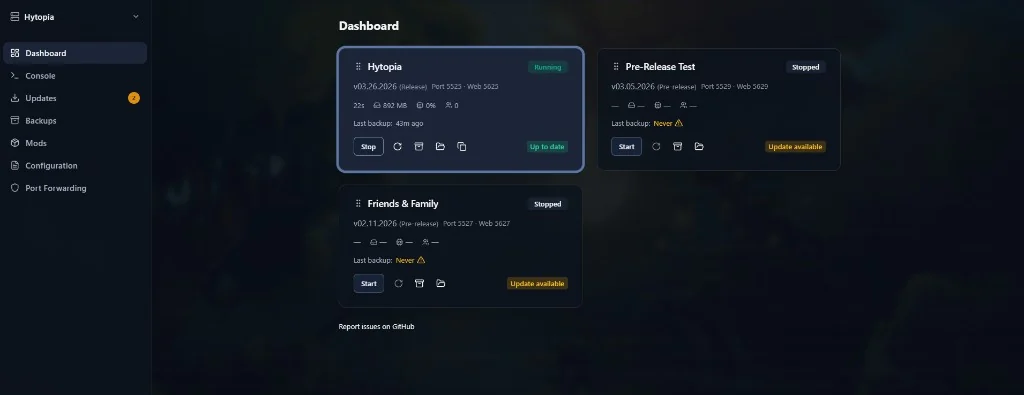
The app
Create and switch between server instances from one app.
Create backups and restore a previous server backup when needed.
Check for server updates and apply them from the app.
Getting started
Get the latest verified release from GitHub.
Open Hytale Server Manager on your Windows PC.
Add a new server instance or bring in an existing setup.
Daily workflows
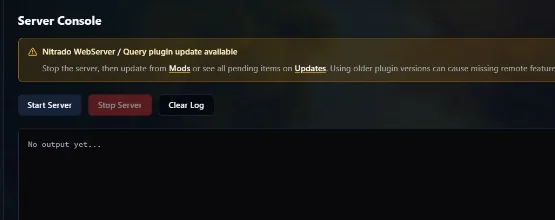
Use the console to check server output and run routine commands without switching between tools.
Keep instance settings, update alerts, and backup controls within the same app.
Optional support
Core features are free. Patreon supporters can access eligible experimental features and help fund development.
Common questions
It is a Windows desktop app for starting, stopping, updating, and backing up Hytale servers.
Yes. Core server management features are free.
No. The app manages servers on your own system or environment. It is not a hosting provider.
Yes. You can create and switch between separate server setups in one app.
The current documented desktop release supports 64-bit Windows 10 and Windows 11.
No. Patreon is optional and provides eligible experimental extras for supporters.
Get the free core app and manage your Hytale servers from one place.